App · by gizlet
Bud Office
A pixel office on your handheld where every Codex and Claude Code session on your computers is a little worker at a desk. See who is busy, who needs you and who is done.
github.com/gizlet/bud-officev0.1.0MITNov 28, 2026

Screenshots

About
Your AI agents, at their desks
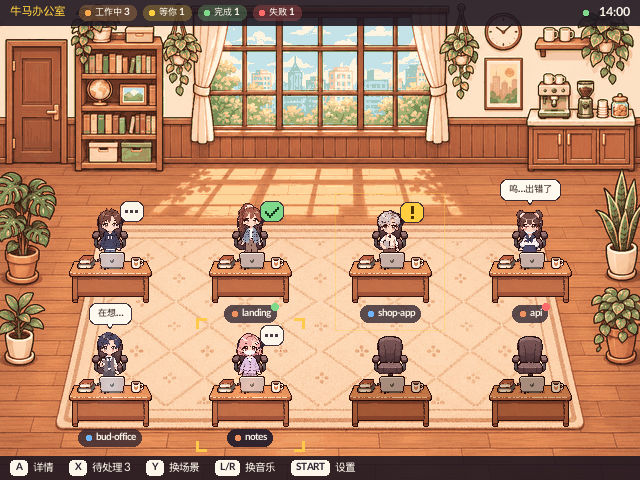
Bud Office turns your handheld into a little pixel office. Every Codex or Claude Code session on your Mac or Windows PC walks in, takes a desk and gets to work. Glance at the screen to see who is busy, who is waiting for you and who has finished.
- Working: the character types away, and now and then says what it is doing, like "Running cargo test".
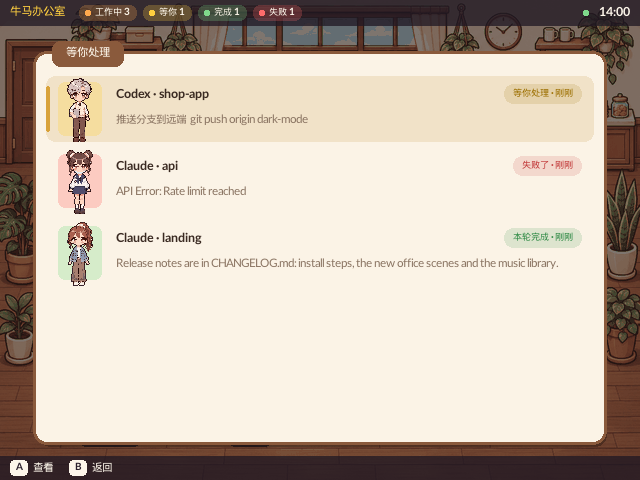
- Needs you: a yellow "!" bounces and a knock plays when an agent asks for approval. Press X for everything waiting on you.
- Done: the character jumps up, cheers "All done!" in its own voice and a chime plays.
- Failed or quiet: a little rain cloud, or a "?" when no news has come for a while.
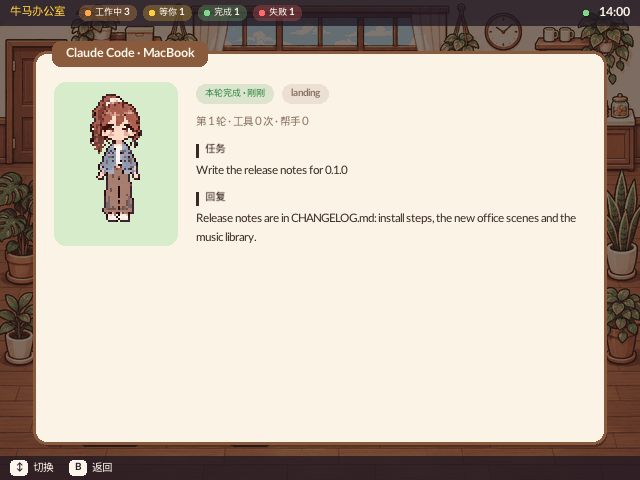
Press A on a desk to read the task, the latest command and the reply.
Setting up
Open Bud Office, press START and choose Connect computers. On your computer, open the address shown on the handheld, enter the pairing code and copy the one setup command it gives you into Terminal or PowerShell. In Codex, trust the new hooks once. Your computer and the handheld need to be on the same network.
The handheld only shows what your agents report; it never controls them. Approvals are still made on your computer.
Make it yours
Switch between rooms with Y, pick music with L and R (CC0 piano recordings and music-box tunes made by the app), and set the volume, voices and more under START.
Characters, furniture and rooms were made for Bud Office. Fonts: Lato (OFL) and Droid Sans Fallback (Apache 2.0). Music: Kimiko Ishizaka's Open Goldberg Variations and the FreePD library, both CC0.